 Again or Never
Remember what's worth buying again.
Again or Never is a simple taste diary. Snap a product and mark Love or Nope. Next time you shop, scroll through your saved photos or scan a barcode you linked before, and see your own verdict.
Coming soon to Google Play · Free · Android 8.0 and up · No account needed

Save a taste in a few taps
You do not need to be a gourmet or write a review. A photo and one verdict are enough.
Snap it
Open the app and take a photo of the bottle, the pack or the plate.
Mark Love or Nope
One tap saves the entry. Not tried it yet? Mark it Want to try.
Check before you buy
At the shelf, scroll through your saved photos or scan a barcode you linked before, and see your own verdict.
Made for the moment you stand at the shelf
Was this the cheese you loved, or the one you threw away? Open In the store mode or scan the barcode and you have the answer in seconds.
- Large photos, clear marks. A heart for Love, a cross for Nope, a star for Want to try.
- Barcode scanner. Scan a pack you saved before and see your photo, verdict, rating, price, place and date.
- Filters that remember. Filter by store, category or verdict. The app remembers your last store.
- No ads while you shop. The shopping and scan flow stays clean.
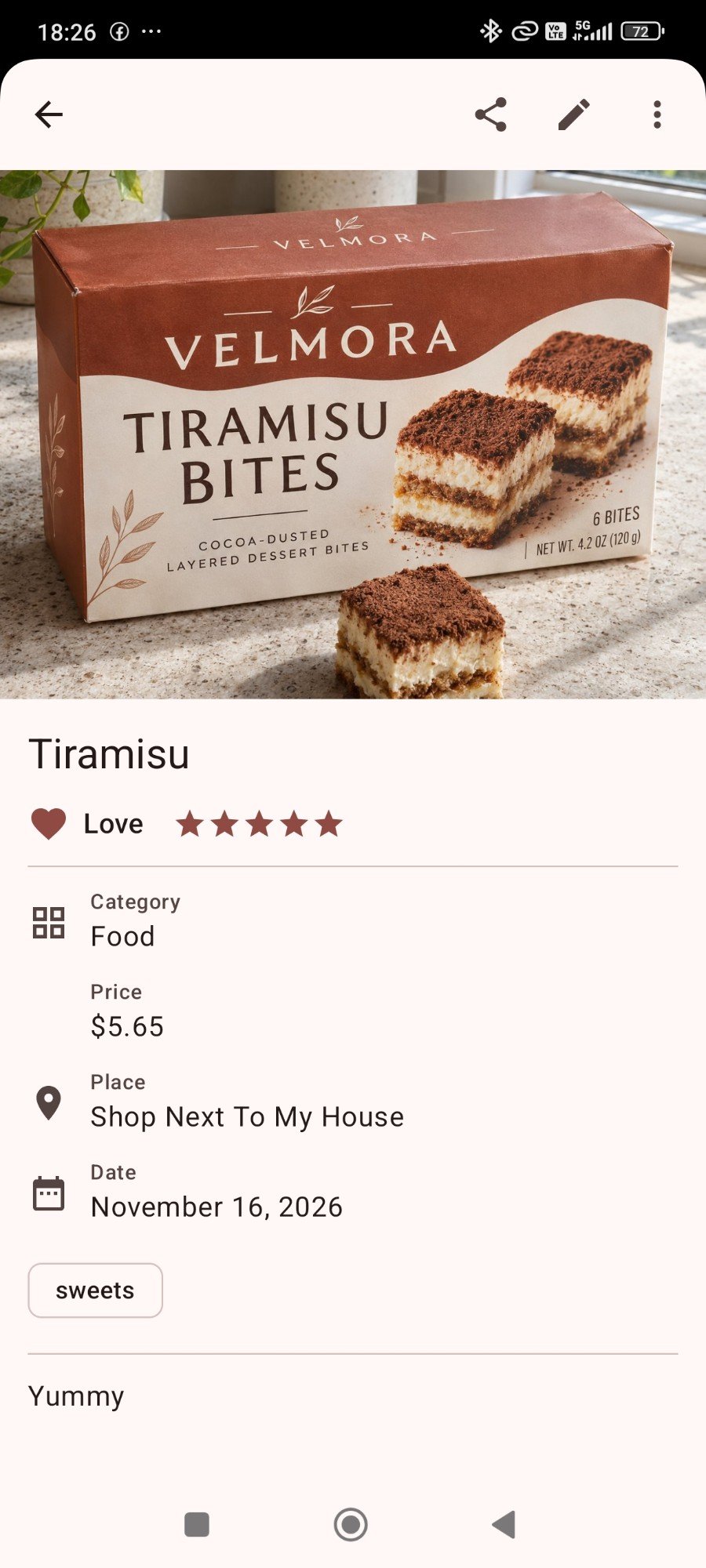
Everything a food and drink diary needs
The form starts short. Details are there when you want them and out of the way when you do not.
Photo first
Start with the camera. A name, stars, price, place, tags and a note can be added later.
Any category
Wine, food, cheese, coffee, beer, restaurant dishes, or your own categories.
Barcode memory
Link a barcode to an entry once. Next time one scan brings your verdict back.
Buy again list
Your Love products, sorted by the place you last bought them. Nothing to type.
Want to try list
Keep a wish list of things to taste. You can add one without a photo.
Search and sort
Search by name, note, place and tags. Filter and sort the way you shop.
Backups you control
Export a ZIP, restore it later, or turn on automatic copies to a folder you choose.
One tap to Scan
A home-screen widget, a quick-settings tile and app shortcuts open the scanner right away.
One diary for everything you taste
Use Again or Never as a wine journal, a coffee log and a list of groceries worth buying again.
Wine journal
Remember the bottle you loved and the one you would never buy again, without tasting notes homework.
Coffee journal
Keep track of beans, roasters and cafés so a good cup is never a lucky accident.
Grocery favourites
Stop buying the same disappointing yoghurt twice. Build a buy-again list as you shop.
Your tastes stay on your phone
No account, no sign-up, no server of ours. Your entries, photos, notes and places are kept on your device.
- Works offline. Saving, searching and scanning need no connection.
- On-device barcode reading. Photos and barcode numbers are not sent to Google.
- Location only when you ask. It is saved only when you tap Add current location, and it is not included when you share an entry.
- Honest about ads. Small banners from Google AdMob on some screens, never in the shopping and scan flow. Where consent is required, you can change your ad choices in Settings.
Good to know
If Android backup is turned on in your phone settings, Android may keep a copy of the entries database, without photos, in your own Google account.
Your own ZIP backups go only where you save them.
Questions and answers
Is Again or Never free?
Yes. The app is free. Some screens show a small banner ad from Google AdMob. Ads are not shown in the shopping and scan flow, so nothing gets in the way when you are standing at the shelf. In regions where Google requires consent for ads, the app asks first, and you can change your choice later in Settings > Privacy settings.
Do I need an account?
No. There is no sign-up and no login. Install the app and save your first entry.
Where are my entries and photos stored?
On your phone. The app has no server of its own and does not upload your entries. If Android backup is turned on in your phone settings, Android may keep a copy of the entries database, without photos, in your own Google account. The privacy policy has the details.
Does it work without internet?
The core features work offline: saving entries, searching, the In the store mode and barcode scanning. Ads need a connection. When your phone is online, Google's barcode component may also send usage and diagnostic metrics; your photos and barcode numbers are not sent.
What can I keep track of?
Anything you eat or drink: wine, food, cheese, coffee, beer, a dish in a restaurant, or a category you create yourself.
How does the barcode scanner work?
Point the camera at a barcode. If you saved that product before, you see your photo, verdict, rating, price, place and date. If not, the app offers your recent entries without a barcode so you can link the code to one of them, or create a new entry. The app recognises the products you saved; it does not look them up in an online catalogue.
Never buy a disappointment twice
Start your taste diary with the next thing you eat or drink.
Coming soon to Google Play · Free · Android 8.0 and up · No account needed